Getting Started in Sandworm Playground
Day-one walkthrough for becoming a sandworm, wrecking the map, and earning your first unlocks.
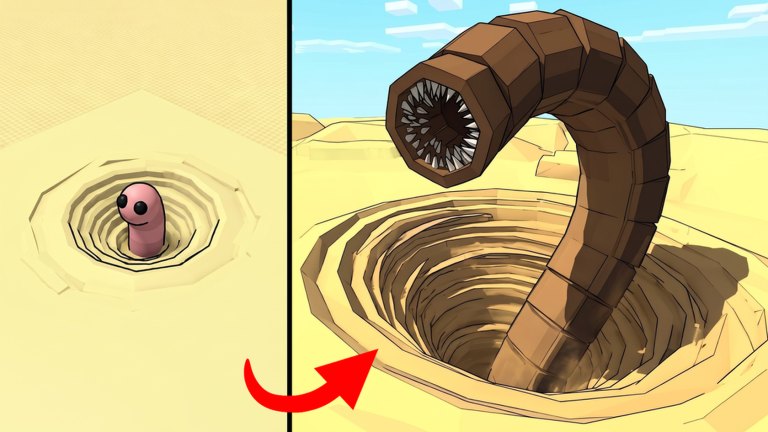
Sandworm Playground is a Roblox simulation sandbox from Kami Stuff. where you spawn as a giant sandworm and earn XP by destroying everything in your path. This beginner guide covers your first ten minutes: how to join, what the core loop expects, which mistakes slow new players down, and where to go next on this wiki.
The official store blurb is short on purpose. Once you are in a server, the fun is pure chaos — props flying, worms colliding, XP ticking up — but structured play still wins. Treat your first session like a tutorial you write for yourself.
Before you press Play
- Open the official experience: Sandworm Playground on Roblox.
- Favorite the game and consider joining the Kami Stuff. group for shout updates.
- On mobile, switch to a stable network; destruction games stream lots of physics updates.
- Skim live codes so you can redeem anything active after you spawn.
Server size caps at about ten players, so lobbies feel personal. You will share prop piles with others — that competition is part of the sandbox fantasy.
Minute-by-minute first session
Minutes 0–2: Load in, accept that you are no longer a standard Roblox avatar, and rotate the camera until you can see your worm body clearly. If steering feels inverted or sluggish, jump to the controls guide before you blame the map.
Minutes 2–5: Drive into the nearest cluster of breakable objects. Do not sprint past them looking for a “special” area. Early XP comes from volume. Watch the feedback when objects shatter — that confirmation tells you the loop is working.
Minutes 5–10: Expand your route. Circle the playground, note which structures respawn or remain dense, and avoid empty sand flats. When XP slows, reposition instead of ramming the same cleared tile.
Watch a real starter session
The embedded video below shows a practical “wreck the map for XP” opener. Watch the middle portion for pacing ideas, then return to the written checklist so you can repeat the route without the video playing.
Core loop in one sentence
Become a sandworm → destroy map objects → earn XP → unlock new sandworms → destroy even more.
Everything on this wiki supports that sentence. The tier list helps you pick stronger bodies, the roster explains what you are unlocking, and the XP farming guide optimizes the destroy step.
Common beginner mistakes
- Touring instead of smashing. Sightseeing is fine for thirty seconds. Progression needs collisions.
- Ignoring other worms. If a pile is contested, peel toward a second cluster instead of waiting.
- Spending the first unlock on a novelty worm. Read How to Unlock Sandworms and prefer an efficient farmer.
- Skipping codes. Free gifts disappear quickly after milestones — keep the codes hub bookmarked.
- Fighting the camera. Fix sensitivity early via controls.
Goals for your first hour
- Comfortably steer without constant camera resets.
- Clear at least two dense prop neighborhoods in a loop.
- Redeem any active codes.
- Identify your next unlock target on the tier list.
- Favorite this wiki’s Guides Hub for the next session.
How this game differs from survival sandworm titles
Roblox has several worm-themed experiences where you flee or hunt as a predator. Sandworm Playground is a destruction playground: you are the spectacle. Your job is chaos and collection, not stealth. If a guide or video talks about hiding from a worm, you are watching a different game.
After the tutorial energy fades
When the first thrill settles, shift into deliberate grinding:
- Follow XP farming routes.
- Track patch changes on Updates.
- Avoid shady automation listed under Scripts unless you accept ban risk on an alt.
Checklist before you close Roblox
- Did XP increase this session?
- Do you know which worm you want next?
- Did you redeem codes?
- Did you note one high-density smash zone for tomorrow?
If you answered yes to those four, your first day in Sandworm Playground already beats most aimless joins. Come back to this Getting Started page only when you invite a friend — then send them here so they skip the empty-sand mistake.
Frequently Asked Questions
Quick answers for Sandworm Playground players.
Is Sandworm Playground free?
Yes. It is a free-to-play Roblox experience. Optional purchases may appear, but the core smash-for-XP loop does not require spending.
What should I do first after spawning?
Learn camera controls, smash the nearest prop cluster, and confirm XP is rising before exploring far away.
How big are the servers?
Official listings show a server size around ten players, so expect intimate public lobbies.
Where do I go after this beginner guide?
Read Controls, then XP Farming, then Unlock Sandworms, and compare targets on the tier list.